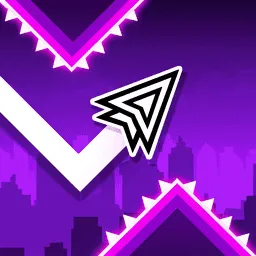
Geometry Dash Wave
Geometry Dash Wave
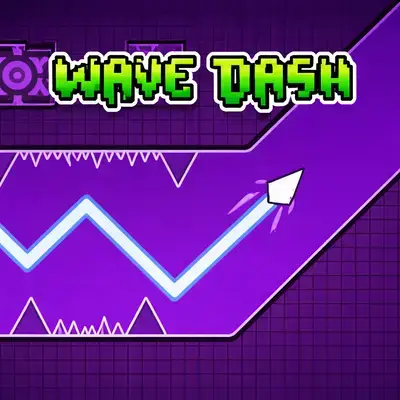
Geometry Dash Wave is one of the most intense modes in the Geometry Dash levels universe. Instead of controlling a jumping cube, you pilot a wave that moves diagonally — hold to go up, release to go down. The challenge is navigating through impossibly tight gaps between spikes while everything moves at breakneck speed.
Originally introduced in Geometry Dash v1.9, the wave mechanic quickly became a fan favorite due to its precision-heavy gameplay. Custom wave-only levels have spawned entire speedrun communities, and some of the most viral Geometry Dash clips feature wave sections. If you enjoy rhythm games that demand pixel-perfect timing, Geometry Dash Wave delivers that rush in every second of gameplay.
The wave mode is pure reflex and rhythm — no story, no power-ups, just you versus the obstacles. Every attempt teaches you something new, and finally clearing a section you've failed dozens of times is incredibly satisfying. If you love this kind of geometric challenge, make sure to also try Geometry Rash for another addictive platform game experience!
How to Play Geometry Dash Wave
Understand the Wave Mechanic
Unlike the standard cube mode where you tap to jump, the wave moves diagonally. Hold the mouse/spacebar to move the wave upward, and release to move it downward. Mastering this simple control is the foundation of every wave level.
Navigate Through Tight Gaps
Levels are filled with spike corridors that leave barely any room for error. Keep your movements smooth and steady — jerky inputs will send you straight into obstacles. Small, controlled adjustments work far better than dramatic swoops.
Follow the Rhythm
Like all Geometry Dash levels, the obstacles are synced to the music. Listen to the beat and let the rhythm guide your timing. Once you lock into the song's pattern, your survival rate improves dramatically.
Practice and Memorize
Use practice mode to break difficult sections into smaller parts. Each level has a fixed layout, so memorization is your biggest advantage. After enough attempts, your muscle memory takes over and the wave almost guides itself.
Controls
- Click or tap to control the wave direction. Hold to go up
- release to go down.
Tips for Success
Stay low when possible. Hugging the bottom of the screen gives you more reaction time to adjust upward than trying to recover from a high position.
Use practice mode religiously. Drop checkpoints at tricky sections and repeat them until the movement feels automatic. This is how every top player learns levels.
Keep your device notifications off. On mobile, one pop-up during a perfect run can ruin everything. Turn on Do Not Disturb before playing.
Watch the gaps, not the spikes. Focus on where you need to go, not what you need to avoid. This subtle shift in attention makes a huge difference in reaction time.
Play with sound on. The music isn't just for atmosphere — it's a gameplay tool. Many rhythm games players find that audio cues help more than visual ones.
Features
- Pure wave-mode gameplay focused on precision and reflexes
- Rhythm-synced obstacles that match the music beat
- Instant restart — no loading screens between attempts
- Progressive difficulty that ramps up with each section
- Neon geometric visuals with smooth animations
- Browser-based — plays directly on PC, tablet, or mobile
- No downloads or installs required
Why Play Geometry Dash Wave?
The wave mode strips Geometry Dash down to its purest challenge: raw reflexes and rhythm. There's no complexity to hide behind — either your timing is on point or it isn't. That's what makes it so addictive. If you enjoy this level of precision gameplay, explore more Geometry Dash levels or challenge yourself with Geometry Rash, our featured jumping game!
FAQ
Ready to play Geometry Dash Wave? Join the fun now!











Comments